Introduction: Why Every Indian Business Is Talking About Webflow
If you have been exploring website platforms recently, one name keeps coming up — Webflow.
From Bangalore startups to Mumbai agencies, from Hyderabad SaaS companies to Delhi-based D2C brands – Indian businesses of every size are switching to Webflow, and for very good reasons.
But what exactly is Webflow? Is it right for your business? How does it compare to WordPress? And where do you find a reliable Webflow developer in India?
This pillar guide answers every single one of those questions. By the end, you will have everything you need to make a confident, informed decision about your next website.
Let’s dive in.
Chapter 1: What Is Webflow?
Webflow is a visual web development platform that allows you to design, build, and launch fully custom, responsive websites – without writing a single line of code.
It was founded in 2013 and is now trusted by over 300,000 companies worldwide, including brands like Dropbox, HelloSign, and Lattice.
Unlike traditional website builders, Webflow does not lock you into pre-made templates. It generates clean, semantic HTML, CSS, and JavaScript – the same quality of code a skilled developer would write by hand.
How Webflow Compares to Other Platforms
To understand where Webflow fits, think of it this way:
Wix / Squarespace – Like building with pre-fabricated LEGO blocks. Easy to get started, but you are limited to the blocks they give you. Customization has a hard ceiling.
WordPress – Like being handed a huge box of unsorted LEGOs, a blurry instruction manual, and dozens of third-party add-on kits that may or may not work together. Extremely powerful, but complex and maintenance-heavy.
Webflow – Like having a 3D printer for LEGOs. You design and create exactly the block you need, ensuring a perfect custom fit every single time.
Who Uses Webflow?
- Startups building investor-facing websites and SaaS marketing sites
- Agencies creating high-performance client websites
- D2C brands that want unique, conversion-focused design
- Freelancers and designers who want to build without a developer
- Enterprise companies building marketing and campaign microsites
Chapter 2: Why Indian Businesses Are Choosing Webflow in 2025
India’s digital economy is growing at an extraordinary pace. With over 700 million internet users, a booming startup ecosystem, and increasing global competition, Indian businesses can no longer afford average websites.
Here is why Webflow has become the platform of choice for ambitious Indian businesses.
1. Unmatched Speed and Performance
India is a mobile-first market. A majority of your customers are browsing on smartphones, often on 4G connections. Speed is not just a technical metric – it directly impacts your revenue.
Research shows that a 1-second delay in page load time leads to a 7% drop in conversions. Webflow sites are fast because they do not rely on bulky themes or performance-slowing plugins. They generate clean, optimized code and are hosted on a global CDN (Content Delivery Network), ensuring lightning-fast load times for users in Mumbai, Bangalore, Delhi, or any city across India.
2. Superior SEO – Built Right In
Getting found on Google is a top priority for any Indian business. Webflow is built for modern SEO from the ground up.
You get complete control over every element that matters to search engines:
- Clean, semantic HTML that Google loves
- Full control over title tags, meta descriptions, and URL structures
- Easy image alt-text management
- Built-in XML sitemaps
- Schema markup support
- Mobile-first responsive design – a key Google ranking factor
With WordPress, you need multiple plugins (Yoast SEO, a caching plugin, an image optimizer, a schema plugin) to achieve the same level of SEO control that Webflow provides out of the box.
3. Zero Maintenance and Fort Knox Security
This is one of the biggest relief factors for Indian business owners.
The number one security vulnerability for WordPress sites is outdated plugins. With Webflow, there are no plugins to update. Ever. Security patches, hosting maintenance, and performance optimization are all managed by Webflow’s expert team.
You focus 100% on running your business. Not on emergency calls about a hacked website.
4. Total Design Freedom Without Code
Your brand is unique. Your website should be too.
Webflow allows for truly custom design – complex scroll animations, unique page layouts, interactive hover effects, and dynamic content – all built visually. This level of design quality is simply impossible on template-based builders like Wix or Squarespace, and requires expensive custom development on WordPress.
5. All-in-One Simplicity
Webflow bundles hosting, SSL, security, and a CMS into one subscription. For a small Indian startup team without a dedicated IT department, this is a massive operational advantage.
No separate hosting provider. No server management. No plugin conflicts. One platform, one bill, everything handled.
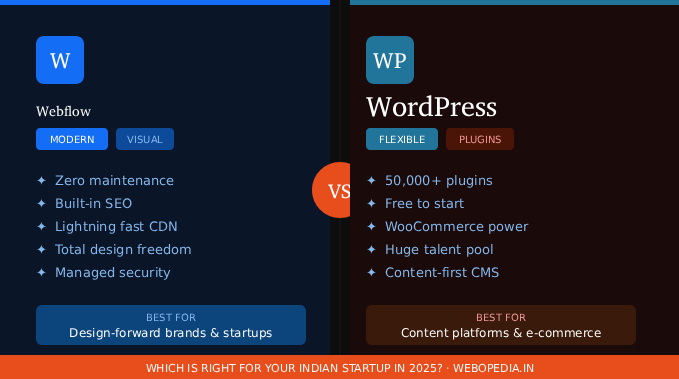
Chapter 3: Webflow vs WordPress – The Complete Honest Comparison
This is the most common question Indian businesses ask. The honest answer is that neither platform is universally better. They serve different needs. Here is the full breakdown.
Design and Customization
Webflow offers pixel-perfect design control. Every element on the page – its position, size, animation, spacing – is in your hands, visually. No theme restrictions. No layout limitations.
WordPress is highly customizable, but truly unique design usually requires either a premium theme (which still has design constraints) or custom development work from a developer.
Verdict: Webflow wins for design-forward brands.
Speed and Performance
Webflow sites are fast by default. Clean code, global CDN hosting, automatic image compression, and no plugin overhead make Webflow consistently outperform WordPress on Core Web Vitals scores.
WordPress performance depends heavily on your hosting provider, theme quality, and plugins. A well-optimized WordPress site can be fast, but it requires significant ongoing effort.
Verdict: Webflow wins for out-of-the-box performance.
SEO
Webflow gives you complete on-page SEO control natively – no plugins needed. Clean semantic code gives you a structural advantage in search rankings.
WordPress with the right plugins (Yoast, RankMath) is equally capable from an SEO standpoint. The difference is the setup effort required.
Verdict: Tie – Webflow wins on simplicity, WordPress matches on capability with plugins.
Security and Maintenance
Webflow is a managed platform. Zero plugins means zero plugin vulnerabilities. Webflow handles all security, updates, and hosting infrastructure.
WordPress puts the security responsibility on you. Outdated plugins, weak passwords, and poor hosting choices are responsible for the vast majority of WordPress hacks.
Verdict: Webflow wins clearly.
E-commerce
Webflow has a growing e-commerce feature set. It is good for simple product catalogues and direct checkout experiences.
WordPress with WooCommerce is the industry standard for complex e-commerce — large product catalogues, advanced inventory management, multiple payment gateways, and extensive customization.
Verdict: WordPress wins for complex e-commerce.
Content Management
Webflow CMS uses a powerful Collections system. You define the structure of your content once, design around it once, and add new entries that automatically flow into your design. Great for blogs, case studies, team pages, and portfolios.
WordPress was built for content publishing. Its multi-role editorial system (Admin, Editor, Author, Contributor) and mature content workflows make it the better choice for content-heavy publications, news portals, and multi-author blogs.
Verdict: WordPress wins for content-heavy publishing.
Cost
Webflow is subscription-based. Plans start around $14/month for basic sites and go up based on CMS items, e-commerce, and team features. Hosting is included.
WordPress software is free, but you pay for hosting (₹200–₹2,000/month depending on provider and plan), premium themes (₹3,000–₹15,000), premium plugins, and developer time.
Verdict: WordPress has a lower initial cost. Webflow often wins on total cost of ownership when you factor in developer and maintenance costs.
Complete Comparison Table
| Feature | Webflow | WordPress | Wix / Squarespace |
|---|---|---|---|
| Design Control | Total freedom | Theme-dependent | Template-based |
| Speed & Performance | Excellent (built-in) | Needs optimization | Average |
| SEO | Excellent (built-in) | Good (plugins needed) | Basic |
| Security & Maintenance | Zero effort | High effort | Zero effort |
| E-commerce | Good (growing) | Excellent (WooCommerce) | Basic |
| Content Publishing | Good | Excellent | Basic |
| Initial Cost | Medium | Low | Low–Medium |
| Plugin Ecosystem | Limited | 50,000+ plugins | Limited |
| Indian Developers | Growing | Massive pool | Small |
| Learning Curve | Steeper | Moderate | Easy |
Chapter 4: Webflow’s Core Features Explained
The Visual Designer
Webflow’s canvas-based designer lets you work directly with real CSS properties – flexbox, grid, padding, margin, transitions – in a fully visual interface. What you design is what gets built. No translation layer, no “approximately what you see is what you get.”
Every element is a real HTML element with real CSS applied. This means the output code is clean, lightweight, and exactly what a developer would write by hand.
The CMS (Content Management System)
Webflow’s CMS is structured around Collections – think of them as databases for your content. You define the structure once (for example: Blog Post has a Title, Date, Cover Image, Body Text, Category) and design a template around it once. Every new blog post you add automatically flows into that design.
This is fundamentally different from the WordPress model where you paste content into a page builder and hope the formatting holds.
Interactions and Animations
Webflow has one of the most powerful visual animation systems of any no-code platform. You can build:
- Scroll-triggered animations (elements that animate as you scroll)
- Page load sequences with staggered reveals
- Mouse movement and parallax effects
- Hover micro-interactions
- Multi-step animations triggered by clicks
All of this is built visually and exported as optimized JavaScript. No GSAP or custom JavaScript knowledge required – though developers can extend with custom code when needed.
Hosting and Infrastructure
Webflow’s hosting runs on AWS and Fastly, giving your visitors access to a global CDN that serves content from the nearest edge node. For Indian users, this means fast load times from servers close to your audience.
Every Webflow site automatically gets:
- Free SSL certificate (HTTPS)
- Automatic image compression and optimization
- Asset minification (CSS, JavaScript)
- DDoS protection
- 99.99% uptime SLA on paid plans
Webflow Logic (Automation)
Webflow Logic is a newer feature that allows you to build basic backend workflows without code – form submissions triggering email sequences, conditional content, and simple automations – directly within Webflow.
Chapter 5: Top Webflow Development Services in India
India has emerged as a global hub for Webflow talent. Skilled Webflow designers and developers across the country deliver world-class work at rates that are significantly more competitive than US or European agencies.
What to Look for in an Indian Webflow Agency or Developer
Before hiring, verify these things:
- A portfolio of live, published Webflow sites (ask for .webflow.io preview links to verify)
- Demonstrated expertise in Webflow CMS Collections and dynamic content
- Experience with Webflow Interactions and the animation system
- Understanding of SEO best practices specific to the Indian market
- Post-launch support, documentation, and content team training
- Clear communication in English or your preferred regional language
- Transparent, milestone-based pricing (preferably quoted in INR)
- Client references you can actually speak to
Typical Project Costs in India (2025)
| Project Type | Timeline | Approximate Cost (INR) |
|---|---|---|
| Simple brochure site (5–8 pages) | 2–4 weeks | ₹40,000 – ₹80,000 |
| Marketing site with CMS blog | 4–6 weeks | ₹80,000 – ₹1,50,000 |
| Startup or SaaS website | 6–10 weeks | ₹1,50,000 – ₹3,00,000 |
| Enterprise or complex interactive site | 10+ weeks | ₹3,00,000 and above |
These figures are estimates. Actual costs depend on the agency’s experience level, project complexity, number of pages, custom animations required, and post-launch support scope.
Cities with Strong Webflow Talent in India
- Bangalore – largest concentration of Webflow-proficient designers and developers
- Mumbai – strong agency ecosystem with Webflow capability
- Hyderabad – growing tech community with Webflow adoption
- Pune – cost-effective talent with strong technical background
- Delhi NCR – large pool of digital agencies adding Webflow to their offerings
Chapter 6: Should Your Business Choose Webflow?
Choose Webflow if your business:
- Prioritizes design quality and brand differentiation
- Is building a marketing website, SaaS landing page, portfolio, or investor-facing site
- Does not have a dedicated IT or developer team on staff
- Wants an all-in-one, zero-maintenance platform
- Considers page speed and SEO critical to growth
- Wants content editors to make updates without involving a developer
- Plans to scale and needs a platform that grows with them
Consider WordPress instead if your business:
- Is building a content-heavy publication, news portal, or large blog with multiple authors
- Needs a complex e-commerce store with a large product catalogue
- Has a very tight initial budget and a technically capable team
- Requires highly specific functionality only available as a WordPress plugin
- Already has a significant existing investment in the WordPress ecosystem
The Bottom Line
For ambitious Indian businesses that want a fast, secure, beautifully designed, and low-maintenance website — Webflow is increasingly the best choice in 2025.
The question is not whether Webflow is a good platform. It clearly is. The question is whether it fits your specific business needs, team capabilities, and growth plans today.
Chapter 7: Frequently Asked Questions
Is Webflow available in India?
Yes. Webflow is a global platform available to Indian businesses. You can subscribe using international credit or debit cards. Webflow’s CDN has edge locations across Asia, ensuring fast load times for Indian visitors.
Can I migrate my existing WordPress site to Webflow?
Yes, but it requires professional help. Content can be migrated using export/import tools and manual methods, but the design needs to be fully rebuilt in Webflow’s visual editor. Most Webflow agencies include a migration audit in their discovery process. The end result is typically a significantly faster, more secure website.
Does Webflow support Hindi and other Indian languages?
Webflow supports Unicode and can display any Indian script font correctly. For fully multilingual websites with language switching, you would use a third-party integration such as Weglot or Lokalise, both of which have official Webflow integrations.
Is Webflow good for SEO in India?
Very much so. Webflow gives you complete control over all on-page SEO elements, generates clean semantic HTML that search engines prefer, and its CDN-powered speed is a significant ranking advantage – particularly important given Google’s Core Web Vitals ranking signals.
What happens to my website if Webflow shuts down?
A reasonable concern. Webflow allows you to export your site’s HTML, CSS, and JavaScript code at any time. While you would lose Webflow’s hosting and CMS features in such a scenario, you would have your complete website code – unlike some other no-code platforms that offer no export option.
How long does it take to build a Webflow website?
A simple brochure website can be built in 2 to 4 weeks. A full marketing site with CMS, animations, and custom interactions typically takes 6 to 10 weeks. Timeline depends on the scope, number of pages, revision rounds, and content readiness on your side.
Do I need a developer to use Webflow?
For simple sites, a designer comfortable with Webflow can build and manage the site independently. For complex animations, custom code integrations, API connections, or advanced CMS setups, a developer’s involvement adds significant value.
Conclusion: Build a Website as Ambitious as Your Business
Your website is your most important digital asset. It works for your business 24 hours a day, 7 days a week. It is often the first impression a potential customer, investor, or partner has of your brand.
Building it on a platform that limits your design, slows your performance, or demands constant maintenance is a choice that costs you – in missed conversions, in developer bills, and in the opportunity cost of time spent on tech instead of business.
Webflow gives Indian businesses the tools to build something genuinely exceptional – fast, secure, visually distinctive, and built to scale.
If you are ready to explore what Webflow can do for your business, the next step is finding the right development partner who understands both the platform and the Indian market.
Webopedia is here to help you navigate exactly that.